Overview
PINE-SPARKY.2 in POKY is the POKY-revised version of PINE-SPARKY, focused on turning peak-list submission and result import into a few mouse clicks directly from the POKY interface. It provides graphical interfaces to automate and visualize protein secondary structure assignment, hydrophobic core detection, flexibility prediction, 3D structure calculation, resonance assignment, and referencing error detection — built on the Enhanced I-PINE server described in Automatic Assignment.
In ideal cases only three NMR experiments (e.g. 1H,15N HSQC, CBCA(CO)NH, and HNCACB) are needed to obtain backbone chemical shifts and their derived information. PINE-SPARKY.2 supports 38 different NMR experiments in total, including sidechain experiments such as C(CO)NH, H(CCO)NH, and HCCH-TOCSY required for NOE-based 3D structure calculation — see the full NMR experiment profile for the complete list. PINE-SPARKY.2 ships as a built-in part of POKY, so there is nothing separate to install. Every run is reproducible: a KEY is generated for each job, so results can be re-imported at any later time within two-month timeframe. Also, the user can download and use it from a local computer at any time
Background
Secondary structure, 3D structure, dynamics, and protein–ligand interactions can all be obtained from protein NMR spectroscopy, but the most fundamental and time-consuming step is chemical shift assignment. PINE-SPARKY.2 automates and integrates the Enhanced I-PINE assignment engine directly into POKY so that this is as close to seamless as possible, while still keeping the spectroscopist in the loop for verification.
Even though the goal is full automation, verifying results is essential. PINE-SPARKY.2 visualizes Bayesian assignment probabilities with the NDP-PLOT program and color-codes probabilistic labels directly on the spectra, so the quality of the automated assignment is easy to judge at a glance. Because it is fully integrated into POKY, PINE-SPARKY.2 works alongside every other built-in tool — peak picking, strip plots, the Versatile Assigner, and structure calculation — for the fastest practical path from spectra to structure.
Availability
PINE-SPARKY.2 requires only an internet connection and a working POKY installation — see the Installation Guide for your platform. No separate download or plugin installation is needed; PINE-SPARKY.2 is built into every POKY distribution.
Using PINE-SPARKY.2
PINE-SPARKY.2 requires two kinds of information: a) the protein sequence, and b) peaks picked on the supported NMR spectra.
Preparing input
1. Sequence file
Supported sequence file formats are:
- 3-letter-code with indices (
.seq)
MET 1
VAL 2
PHE 3
… - 1-letter-code (
.fasta) —MVF... - 3-letter-code without indices (
.txt)
MET
VAL
PHE
…
Keep the file extension matching your sequence content so PINE-SPARKY.2 recognizes it
correctly. If a sequence is already set in the Sequence Entry window (accelerator
sq) before launching PINE-SPARKY.2 (accelerator
ep), it is picked up automatically. You can also type or
paste a 1-letter-code sequence directly into the Sequence Entry window, which generates a
3-letter-code sequence file (projectname.proj.seq) in the Projects directory
once the working directory is set (accelerator RD). The first
sequence number must be 1 to run PINE jobs — change it afterward with accelerator
rn if needed.
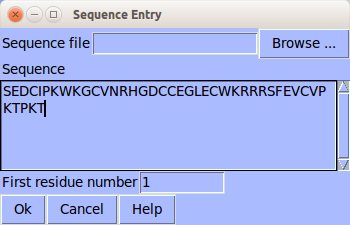
Sequence Entry window (accelerator sq)
Regardless of format, the file must be plain ASCII text — not RTF, DOCX, etc.
2. Peak-picked NMR experiments
PINE-SPARKY.2 currently supports 38 different NMR experiments — 2D HSQCs, the standard 3D backbone/sidechain suite, four 4D experiments, and nine less-common experiment types. See the NMR experiment profile for the full, current list and expected peak format for each.
We recommend truncating unused regions of an experiment (e.g. −1–6 ppm in the 1H dimension of the N HSQC) so PINE-SPARKY.2 recognizes dimension order more reliably. Peaks can be picked with APES automated peak picking (accelerator ae), restricted peak picking (accelerator kr), or manually.
Launching PINE-SPARKY.2
Launch the PINE-SPARKY.2 window with accelerator ep, or from Automated Assignment → Run PINE Automated Assignment (PINE-SPARKY.2). Your name and email are required, since results are also sent to your email.
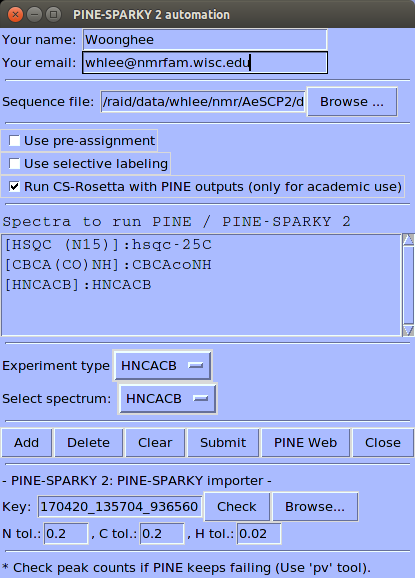
Launched PINE-SPARKY.2 window
Selecting NMR experiments
Add the NMR experiments to be analyzed in the PINE-SPARKY.2 window — select a spectrum and its type, then click Add.
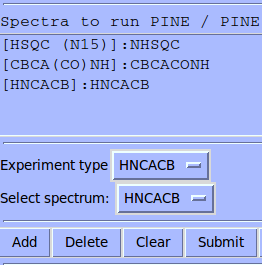
Adding NMR spectra to run PINE-SPARKY.2
Run options
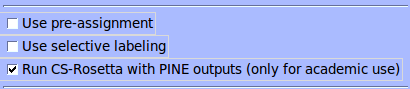
Check box options to improve results and get 3D structures
There are three check box options above the spectrum list:
- Use pre-assignment — incorporates already-assigned resonances into the automated run, reducing the number of choices and improving quality. Under ideal conditions Enhanced I-PINE can exceed 99% completeness and correctness, but practical cases (spin degeneracy, overlapping or drifting peaks) often benefit from an iterative cycle: confirm a few shifts, re-run with pre-assignment checked, repeat.
-
Use selective labeling — restrains the amino acid type(s) expected for
specific 1H,15N chemical shifts, e.g. for
ILV methyl
labeling in larger systems. Attach a user label (accelerator
pl) specifying the expected amino acid types to peaks in the
1H,15N HSQC.
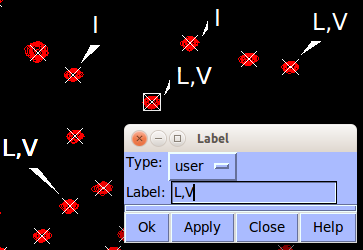 Peaks restrained to certain amino acid types
- Run CS-Rosetta with PINE outputs — sends the assignment to the BMRB-hosted CS-Rosetta server (10,000 structure sampling) to calculate a 3D structure. Results arrive by email separately from the PINE results; for a small protein under 10 kDa, expect roughly a day or more depending on server load.
Job submission
Once everything is prepared, click Submit to start the analysis.
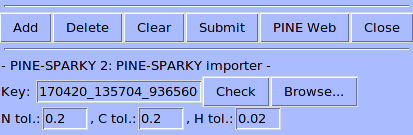
After clicking Submit, a KEY is generated
With only the minimal three experiments, a job typically finishes in under a minute; larger
experiment sets take longer. Click Check repeatedly until the job
completes, or type a KEY manually to re-import a previously submitted job. Results can be
saved under a PINE subdirectory of the working directory automatically, or
browsed to manually if already downloaded.
Visualizing results
When the Enhanced I-PINE server finishes, PINE-SPARKY.2 offers to plot the results with NDP-PLOT:
Secondary structure from backbone chemical shifts
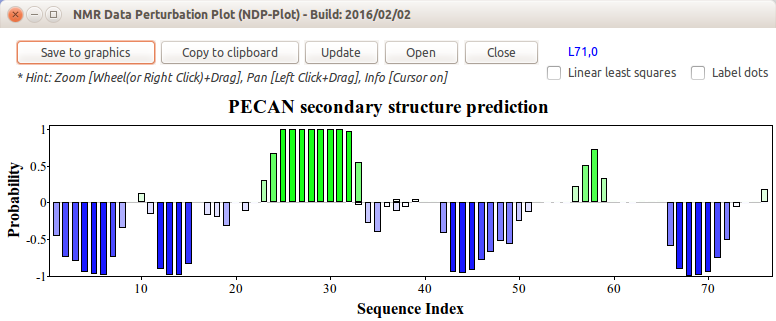
Secondary structure predicted by PECAN (green: helix, blue: strand)
Assignment outliers from secondary chemical shifts
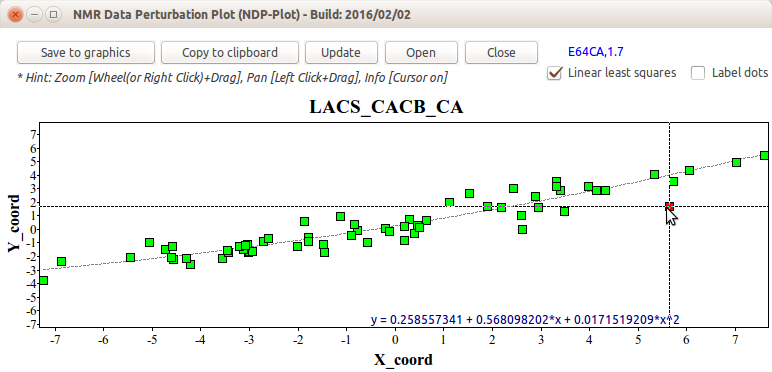
Chemical shift outlier analysis by LACS (red: outlier)
Hydrophobic core prediction
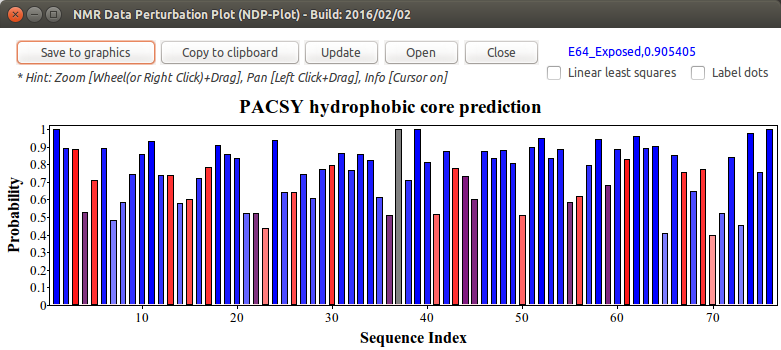
Hydrophobic core residues predicted from the PACSY database by statistical counting (red: buried, purple: medium, blue: exposed, gray: no assignment)
Protein flexibility (RCI-S² order parameter) prediction
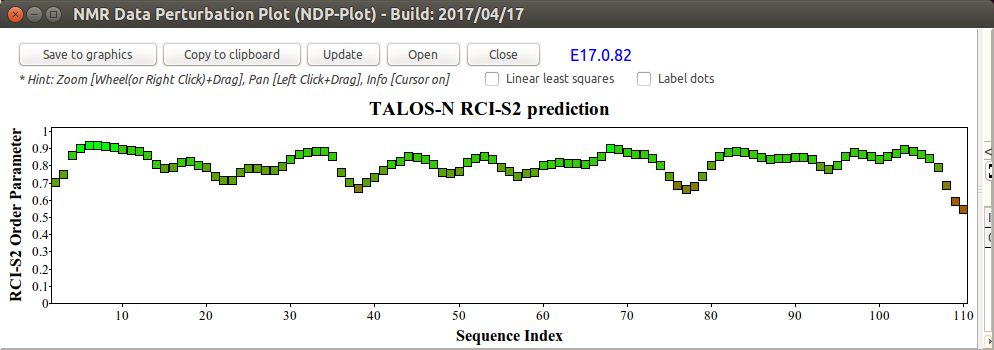
Random Coil Index (RCI) S² order parameter prediction from TALOS-N (Wishart method)
Probabilities for spin system assignments
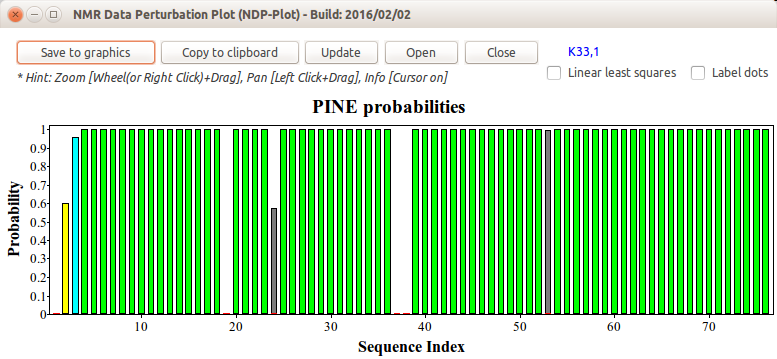
Bar height and color indicate assignment confidence (green: ≥0.99, cyan: ≥0.8, yellow: ≥0.5, red: <0.5, gray: no assignment)
Importing assignments
After plotting, PINE-SPARKY.2 asks whether to import the assignments and generate probabilistic labels on the spectra for further validation. It then asks whether to accept assignments above 0.5 probability — systematic evaluation against the PACSY database shows 0.5 is the most efficient cutoff for balancing correct versus incorrect assignments, but you can decline and use assign the best by PINE (accelerator ab) with a custom probability threshold instead. From here you can use the original PINE-SPARKY accelerators (pp, pr, ab) — see the PINE-SPARKY manual for details. If labels become too crowded, select them with accelerator se and delete with the Delete key.
Spin system connectivity validation
To confirm automatically assigned backbone chemical shifts, check spin system connectivity using the Strip Plot tool (accelerator sp).
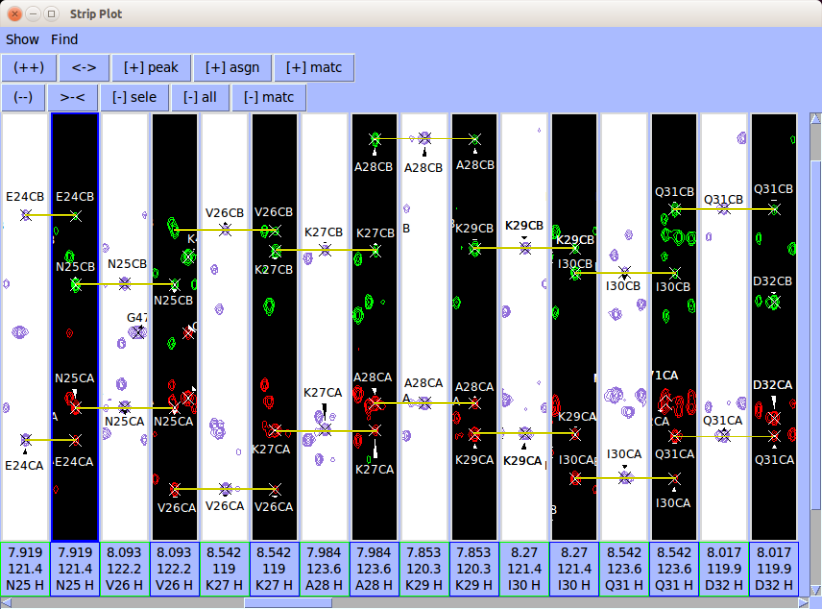
3D structure from BMRB CS-Rosetta
If Run CS-Rosetta with PINE outputs was selected, BMRB CS-Rosetta runs using the Enhanced I-PINE chemical shifts, and you'll receive status update emails from BMRB. When the job finishes, results are automatically incorporated into the PINE-SPARKY.2 URL — click Check again to pull the updated package including the CS-Rosetta structure.
PyMOL visualization scripts are provided: @pine_pymol (PINE probability),
@core_pymol (hydrophobic core), and @rci_pymol (flexibility).
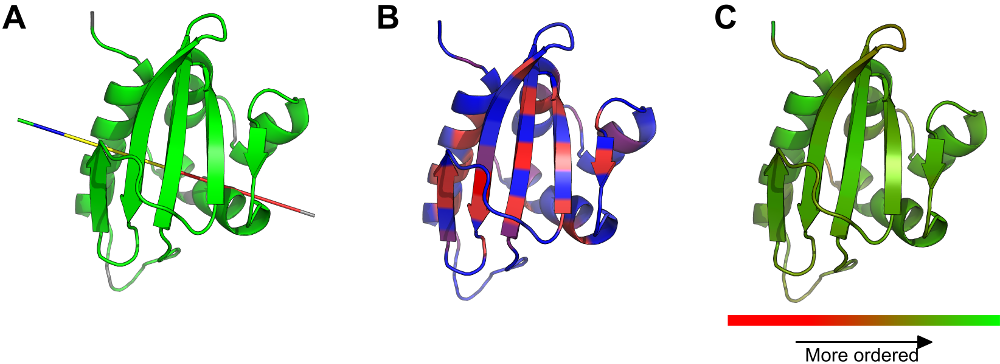
A. PINE probabilities on the structure via @pine_pymol. B. Hydrophobicities
via @core_pymol. C. RCI-S² via @rci_pymol.
Citation
Lee W, Markley JL. "PINE-SPARKY.2 for automated NMR-based protein structure research." Bioinformatics, 2018;34(9):1586–1588. DOI — see also the Publications page.
Technical description
PINE-SPARKY.2 consists of a GUI built into POKY and a server system that runs interactively with it. The key technological difference from the original PINE workflow — upload a peak list, wait for an email, manually import results — is that the Key (job identifier) is generated client-side, not server-side. This lets POKY and the Enhanced I-PINE server communicate interactively: PINE-SPARKY.2 knows the result URL the moment a job is submitted, and simply fetches from it when ready. The key is also emailed for later reuse.
PINE-SPARKY.2 automates the conversion, execution, and visualization of Enhanced I-PINE, PECAN, LACS, PACSY, TALOS-N, and CS-Rosetta. The GUI processes user data inside POKY and sends peak lists, pre-assignment chemical shifts, and labeling information to the server along with the Key. The server performs the heavy computation — running Enhanced I-PINE for probabilistic chemical shifts, then PECAN and LACS in parallel for secondary structure and chemical shift outliers — and the GUI fetches the results.
Once probabilistic chemical shifts exist for a given Key, the server launches a PACSY search, TALOS-N, and (if requested) CS-Rosetta using the highest-probability shifts. CS-Rosetta jobs are tracked in a queue, since they can take hours to days; a periodic check downloads finished coordinates from BMRB to the PINE-SPARKY.2 URL and emails the user.
Server-side Python scripts convert assignment probabilities, secondary structure, chemical
shift outliers, hydrophobicity, and RCI-S² into NDP-PLOT input files and PyMOL scripts.
The GUI launches NDP-PLOT on each downloaded file in turn; PyMOL inputs run from the PyMOL
command line via @command.
The PINE2SPARKY converter and the assign-the-best-by-PINE step (accelerator ab) from the original PINE-SPARKY no longer need to be run separately — POKY's C++/Python interface creates spectrum labels directly from the extension:
import poky
poky.Label(spectrum, 'label', 'color', (position))
The GUI uses this to generate PINE probabilistic labels, with 0.5 as the recommended base cutoff for assign-the-best-by-PINE. After import, connectivity validation via strip plot (accelerator sp) proceeds as described above; strips are generated in residue-number order for a selected assigned segment, with quick-access buttons in the strip plot's top panel. A second, simultaneous strip plot (accelerator SP) validates a different connectivity type (e.g. CA/CB vs. CO/H) side by side with the first.