Overview
PONDEROSA-C/S is the structure-calculation web service of the POKY Team. You prepare your data in POKY (sequence, chemical-shift assignments, NOESY peak lists or spectra, and any restraints you already have) and submit it with one click. The server assigns NOE peaks automatically, turns them into distance restraints, adds dihedral-angle restraints predicted from your chemical shifts, and calculates and evaluates a 3D structure ensemble. When the job is done you receive an e-mail with a link to a results web page and a zip archive that opens in POKY.
- Structures are calculated by SSEP (torsion-angle dynamics; OpenMM refinement).
- Dihedral-angle (backbone phi/psi) restraints, secondary structure and flexibility (RCI-S²) are predicted from your chemical shifts with TAPAS, and these predictions drive the NOE assignment and the structure calculation. TALOS-N still runs alongside it, and its results are included in the job zip for comparison.
- Both solution NOESY spectra and solid-state (heavy-atom dipolar correlation) spectra are supported. The solution state variant of the automated assignment is called AUDANA, and the solid-state variant of the automated assignment is called AUDASA.
In POKY you can start a PONDEROSA-C/S job in two ways: the quick dialog c3 (Calculate 3D structure by PONDEROSA) and the POKY Structure Builder Pb, which offers every option. The results are inspected with the POKY Structure Analyzer Pa.
Calculation modes
All calculation modes use SSEP. The names below are the ones shown in POKY.
| Mode (as shown in POKY) | What it does | Available in |
|---|---|---|
| AUDANA/AUDASA automation (c3: "AUDAN(S)A") |
Automated NOE peak assignment and distance-restraint generation, iterated with structure calculation. With solid-state spectra the same procedure runs as AUDASA. | c3, Pb |
| (ss)PONDEROSA-X refinement | Automated through-space peak identification and distance-restraint generation, with violation management. | Pb |
| Constraints-only X (CONSTRAINTS-X) | No NOE assignment: the structure is calculated from the restraints you supply. Use it when you already have your own distance restraints. | Pb |
| Final step options (implicit or explicit water, and their "(x2)" variants) | Restraints-only calculations meant for the very last stage of a project. | Pb |
In the Structure Builder, the (i) button next to Calculation Option shows a short explanation of each mode.
Submitting from POKY: c3 and Pb
Quick submission: c3
Type c3 to open the PONDEROSA-C/S structure calculation dialog. It takes the sequence and chemical shifts from your open project and runs the AUDANA/AUDASA mode.
- Enter Your name, Email (results are sent there) and a Project name.
- For up to six spectra, pick the Spectrum and its Type: 15N-NOESY, 13C-NOESY (ali), 13C-NOESY (aro), 2D-NOESY, or the solid-state types 2D-CC, 3D-NCOCX and 3D-NCACX. Rows left at DO NOT APPLY are ignored. 4D spectra are not used.
- Optionally open * Show Advanced Options to enter disulfide bonds, cis-prolines, D-residues, phosphorylated amino acids, and promotion/demotion lists of residue pairs (see Residue options).
- Check the options below the buttons:
- Use PACSY supportive scores (on by default) lets the server use PACSY database knowledge, for example from similar structures in the PDB.
- Apply auto peak picking picks NOESY peaks automatically before submission.
- N tol., C tol., H tol.: chemical-shift matching tolerances in ppm (defaults 0.350, 0.350 and 0.025).
- Click Run. POKY filters the peaks against your chemical shifts, packs the data and sends it to the server, then shows a rough time estimate.
The other buttons: Refine only filters (and, with auto peak picking, picks) the NOESY peaks against the current chemical shifts without submitting; Check reminds you that job status arrives by e-mail; Stop interrupts the preparation.
Full setup: POKY Structure Builder (Pb)
Type Pb to open the Poky Structure Builder. It works in a work folder on your computer and gives access to every calculation mode and restraint type.
- Work Folder: use the import button to take the sequence and chemical shifts from the current POKY project and create a new work directory, or choose an existing folder.
- Sequence and Chemical shifts: import them from the current POKY project or open files.
- NMR thru-space data: import peaks from a spectrum of the current project, or open
a peak list (POKY
.list, XEASY.peaks, NMRView.xpk) or a spectrum (.ucsf, NMRPipe.pipe/.ft2/.ft3, NMRView.nv, Bruker2rr/3rrr). For spectra you can set a noise threshold; peaks are picked during Preprocess. - Restraints: add your own restraint files (see Inputs).
- Misc.: cis prolines, disulfide bonds, D-amino acids, phosphorylated amino acids, PACSY boost (a PDB ID and chain, or AUTO), matching Tolerances for H, C and N, and the Calculation Option (the mode).
- Enter the Email address for results and, optionally, a Project name.
- Click Preprocess. The Builder checks the sequence and shifts, reports the proton assignment completeness (with a warning below 60 % for NOE-based runs), may suggest likely oxidized cysteines and cis-prolines, picks peaks, and packs the inputs.
- Click Calculate to send the job to the POKY servers.
Export writes the packed inputs as NMR-STAR 3.2 (.str) or NEF
(.nef) for use in other programs, and Analyzer opens the POKY Structure
Analyzer.
Inputs
Always needed
- Sequence of the protein.
- Chemical-shift assignments (BMRB nomenclature).
- NOESY peak lists (or spectra to pick from) for the automated modes. Solution types: 15N-NOESY, 13C-NOESY (aliphatic), 13C-NOESY (aromatic) and 2D-NOESY. Solid-state types for AUDASA: 2D-CC, 3D-NCOCX and 3D-NCACX.
The Constraints-only and Final step modes do not assign NOEs, so they need at least one upper-distance-limit file or a coordinates file instead of NOESY data.
Optional restraint files (Structure Builder)
| File | Content |
|---|---|
.upl | Upper distance limits (CYANA format) |
.lol | Lower distance limits |
.aco | Dihedral-angle restraints (if you supply one, it is used instead of the TAPAS prediction) |
.rdc | Residual dipolar couplings |
.pcs | Pseudocontact shifts |
.dat | Small/wide-angle X-ray scattering (SAXS/WAXS) data |
.wlt / .blt | PONDEROSA promotion / demotion lists of residue pairs |
.pdb / .cif | Atomic coordinates (PDB or mmCIF) |
.map | CCP4/MRC electron-density (EM) map |
With c3, assigned NOESY peaks between residues that are not sequential neighbours are also sent as distance restraints, and the promotion/demotion lists are typed in the Advanced Options. In the AUDANA and PONDEROSA-X modes, hydrogen-bond restraints are generated by the server; there is no separate hydrogen-bond input.
Residue options
| Option | Format | Notes |
|---|---|---|
| Disulfide bonds | 3-14,45-67 | Pairs of cysteine residue numbers. |
| cis-prolines (cis peptides) | 4,7,52 | List the residue after the cis peptide bond — for a cis X-Pro bond, the number of the proline. |
| D-amino acids | 3,5,27 | Residues with D chirality. |
| Phosphorylated amino acids | 3,5,27 | Phosphoserine, phosphothreonine and phosphotyrosine. Other residue types listed here are ignored. |
In the cis, D-amino-acid and phosphorylation lists, residue numbers outside the sequence and malformed entries are dropped by the server with a warning instead of stopping the job.
After you submit
- "Job submitted" e-mail. You receive an e-mail confirming the submission, with your job ID and a link to your job page. Keep it for any questions about the job.
- Calculation. The job runs on one of the compute servers (see Computing resources). If all servers are busy, it waits for a free one. A calculation usually takes hours; POKY shows a rough estimate when you submit.
- Results e-mail. When the job finishes you receive an e-mail with a link to the results page, a download link for the job zip, a link to the TAPAS dashboard of the backbone-angle prediction, a quick-look image of the ensemble, and a summary of the evaluation numbers.
If the job fails, the e-mail says so and includes the reason (see Troubleshooting).
Following a running job
The job page is live while the calculation runs. It shows the current stage, a timeline of the stages (preparation, backbone angles (TAPAS), each structure-calculation run, finishing), and charts that grow with every completed run: distance restraints by range, energies, violations and RMSD. The page reloads itself every 30 seconds and its content is updated about every two minutes and whenever a stage finishes, so you can leave it open. When the job finishes, the same address shows the results page.
The results page
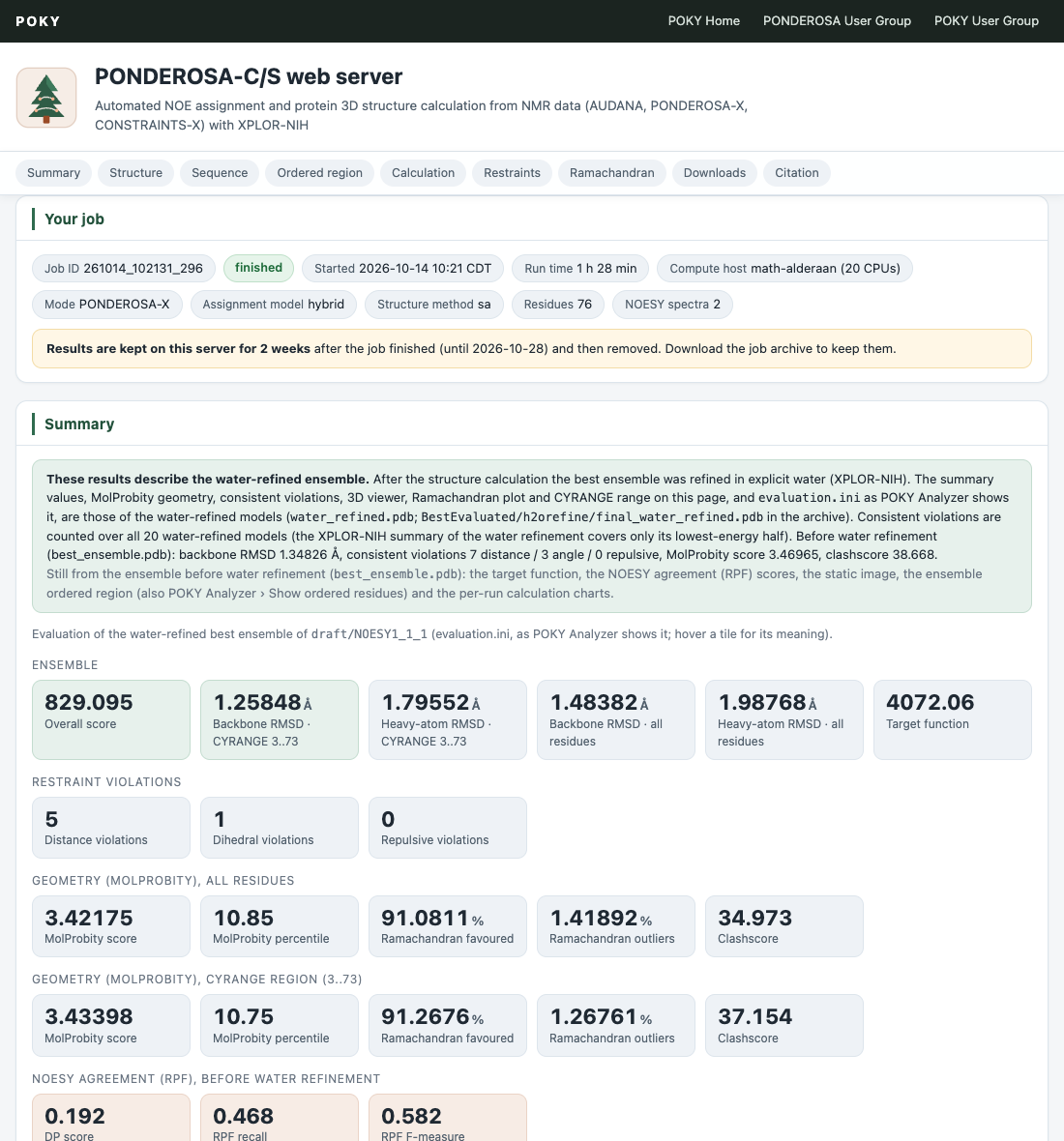
The results page is a single web page for your job. It opens with a Your job card (job ID, run time, calculation mode, number of residues and NOESY spectra, and the date until which the results are kept), followed by these sections:
| Section | What it shows |
|---|---|
| Summary | The evaluation numbers of the best ensemble, printed exactly as the POKY Structure Analyzer shows them: overall score, backbone and heavy-atom RMSD over the CYRANGE region, the target function, and the numbers of consistent violations (distance, dihedral and repulsive restraints violated in at least 60 % of the models). MolProbity geometry (MolProbity score and percentile, Ramachandran favoured and outliers, clashscore) is given both for all residues and for the CYRANGE region. RPF/DP scores are added when they were computed. |
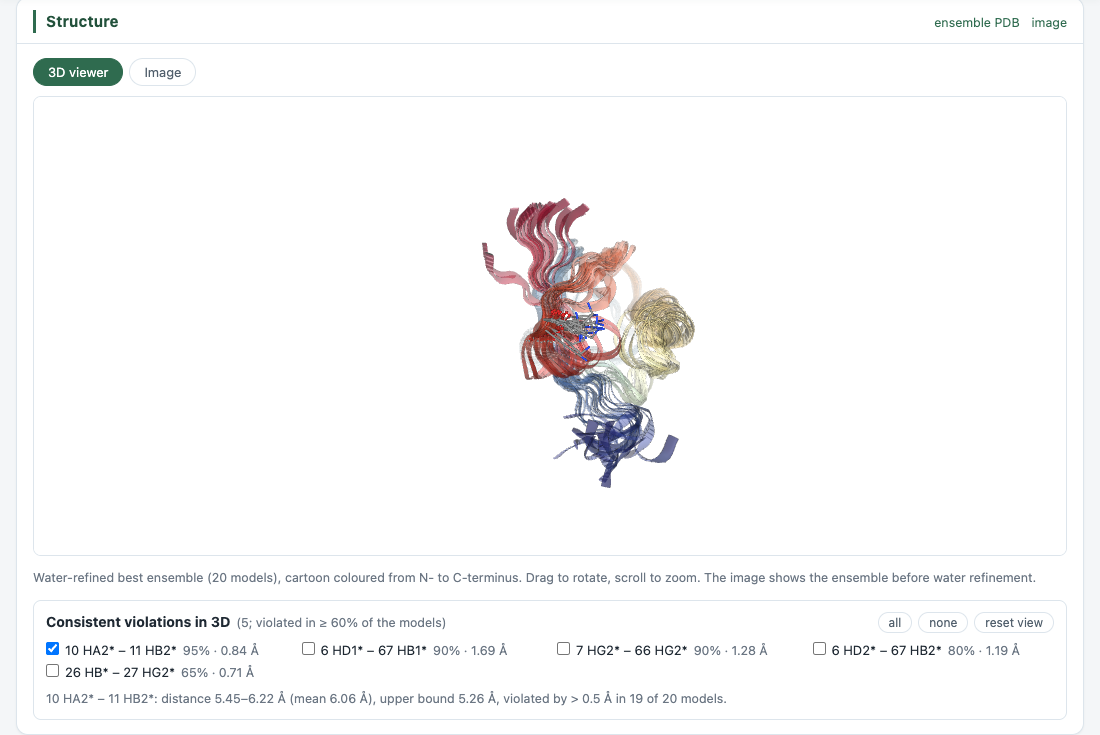
| Structure | An interactive 3D viewer of the ensemble. The consistent violations are listed as checkboxes: tick one to draw that restraint in every model (red where it is violated) with the residues shown as sticks. A static image of the ensemble is also shown. |
| Sequence | The sequence with TAPAS secondary structure and the chemical-shift-based flexibility (RCI-S²). The job summary links the TAPAS dashboard (per-residue φ/ψ, confidence and restraints). |
| Ordered region | Secondary structure, rigid residues, the ordered region of the ensemble and the CYRANGE range on one track. |
| Calculation | How the calculation progressed from run to run: numbers of distance restraints by range, ambiguous restraints, dihedral and hydrogen-bond restraints, energies, violations and RMSD, with a table of all runs. |
| Restraints | The final restraint set by class and range, restraint density per residue, and the most violated restraints of the final run (with buttons to show them in the 3D viewer). |
| Ramachandran | A Ramachandran plot of every model with the MolProbity numbers. A checkbox switches the plot and the table to the CYRANGE region only. |
| Downloads | The job zip and individual result files (see below). |
| Citation | The papers to cite (see How to cite). |
Hover over a number in the Summary for a short explanation of what it means.
Water refinement
For most modes the server finishes by refining the best ensemble in explicit water (it is skipped
for some restraints-only modes, and when the ensemble has not converged). When water refinement
succeeds, the summary numbers, MolProbity values, consistent violations, 3D viewer, Ramachandran plot
and CYRANGE region on the results page — and the evaluation.ini file read by the
Structure Analyzer — describe the water-refined ensemble. A note at the top of the
Summary says which values are from the water-refined ensemble and which are still from the ensemble
before water refinement (for example the target function), and quotes the earlier values.
SSEP: Simple Structure Engine by POKY
SSEP is POKY's structure engine for PONDEROSA. It calculates the structures by torsion-angle dynamics with a covalent geometry and force field taken from the published literature, and refines them in implicit or explicit solvent with OpenMM on a GPU. Inputs, the results page, the zip file and the Structure Analyzer work as before; the result e-mail says which engine and which solvent step the job used.
| Step | SSEP |
|---|---|
| Structure calculation | Torsion-angle dynamics; covalent geometry from Engh & Huber (1991), atom radii from MolProbity (Word et al. 1999) |
| CONSTRAINTS-X2 / X4 (implicit solvent) | Each final model minimised with AMBER ff14SB and the GBn2 implicit-solvent model in OpenMM |
| CONSTRAINTS-X3 / X5 (water refinement) | Each final model refined in TIP3P water with AMBER ff14SB in OpenMM, following Linge et al. (2003) |
| Hydrogen-bond restraints | H···O 1.8–2.5 Å and N···O 2.7–3.5 Å distance restraints (Baker & Hubbard 1984) |
| RDC / PCS | Used in the calculation; reports from SSEP's tensor fit |
| SAXS curve | Scattering term after Schwieters & Clore (2014), with a hydration layer (new) |
| Cryo-EM map | Real-space correlation term (Chapman 1995; Topf et al. 2008) (new) |
Quality. In our benchmarks the models are close to the reference structures, and the solvent-refined models have far fewer atom clashes (MolProbity clashscore 3–24 vs 16–54). Run times are far faster than conventional PONDEROSA-C/S.
Downloads and opening results in POKY
The Downloads section of the results page offers the files that were produced for your job:
| File | Content |
|---|---|
<job ID>.zip | The complete job archive for POKY: inputs, every calculation step, the best ensemble and its evaluation |
best_ensemble.pdb | Best structure ensemble, all models (before water refinement, when water refinement was done) |
water_refined.pdb | Water-refined ensemble |
bundle.png | Image of the ensemble |
final.upl / final.lol | Final distance restraints, upper and lower limits (CYANA format) |
final.aco | Dihedral-angle restraints (CYANA format) |
evaluation.ini | Evaluation of the best ensemble (the file the Structure Analyzer reads) |
energy_breakdown.txt | Energy per run |
| assigned peak lists | Your NOESY peak lists with the assignments made by the server |
tapas.aco, tapas_out.tls, tapas_outSS.tab,
tapas_report.json | The TAPAS prediction used by the job (in the zip; the tables have the TALOS-N formats) |
talos.aco, talos_out*.tab | The TALOS-N prediction of the same shifts, for comparison (in the zip; not used by the calculation) |
Opening the results in POKY (Pa)
Download the job zip, unpack it, and open the unpacked folder with the POKY Structure Analyzer (Pa, also reachable from the Builder's Analyzer button). There you can browse the models, restraints, violations and assigned peaks of every calculation step. The Analyzer opens the unpacked folder, not the zip file itself.
How long results are kept
Limits
- Up to 3 running jobs per submitter. A further submission is not started; you get an e-mail asking you to submit again after a previous job has finished.
- Duplicates are skipped. If you submit exactly the same data again while the first job is still running, the copy is skipped and you are told by e-mail.
- Busy servers. When many jobs are running, a new job waits until a compute server is free.
- Data size. At most 10 NOESY spectra and 10 restraint files per job. c3 offers six spectrum slots.
Troubleshooting and help
When a job fails you receive a failure e-mail with the reason, and the results page shows the reason, the stage where the job stopped, and a failure report zip with your inputs and the files written before the failure.
- Failures most often come from atom nomenclature or file formats. The server expects the BMRB naming convention. In POKY, run ca (check protein assignment nomenclature) and then dr (delete unused resonances), and submit again.
- NOE-based modes need a reasonably complete proton assignment; the Structure Builder warns below 60 % completeness.
- Restraints-only modes need upper distance limits or coordinates.
For help, ask in the PONDEROSA user group or the POKY user group.
Computing resources
The computing power for PONDEROSA-C/S is provided by POKY's own servers (Prof. Woonghee Lee's team), the CACMS servers (Department of Chemistry) and the CCM servers (Department of Mathematical and Statistical Sciences), all at the University of Colorado Denver.
How to cite
If you use PONDEROSA-C/S results, please cite:
Lee W, Stark JL, Markley JL. PONDEROSA-C/S: client-server based software package for automated protein 3D structure determination. J Biomol NMR 60(2-3), 73–75 (2014). doi:10.1007/s10858-014-9855-x
Lee W, Petit CM, Cornilescu G, Stark JL, Markley JL. The AUDANA algorithm for automated protein 3D structure determination from NMR NOE data. J Biomol NMR 65(2), 51–57 (2016). doi:10.1007/s10858-016-0036-y
Lee W, Rahimi M, Lee Y, Chiu A. POKY: a software suite for multidimensional NMR and 3D structure calculation of biomolecules. Bioinformatics 37(18), 3041–3042 (2021). doi:10.1093/bioinformatics/btab180
Chiu A, Lee W. Modernizing biomolecular NMR: The POKY suite. J Biol Chem 302(3), 111246 (2026). doi:10.1016/j.jbc.2026.111246
For solid-state NMR (AUDASA) calculations, please also cite:
Rahimi M, Lee Y, Nguyen H, Chiu A, Lee W. A toolset for the solid-state NMR-based 3D structure calculation of proteins. J Magn Reson 339, 107214 (2022). doi:10.1016/j.jmr.2022.107214
Dihedral restraints are predicted with TAPAS; please cite TAPAS as well (and TALOS-N if you use its predictions from the job zip).