Overview
Several POKY functions send your data to POKY's web servers and run the calculation there. Every such job gets a job dashboard: a results web page that shows the job's status while it runs and, once it is done, an interactive summary of the results — numbers, plots, a 3D view of the structure and links to every output file. The dashboard works in any modern web browser; you don't need POKY to read it, so you can send the link to a collaborator.
All dashboards share the same POKY header and the same layout ideas, so once you know one you can read the others.
Supported servers
| Server | What it does | Start it in POKY | How you get the dashboard |
|---|---|---|---|
| PONDEROSA-C/S | Automated NOE assignment and 3D structure calculation with XPLOR-NIH | c3 or the Structure Builder Pb | Link in the e-mail you receive when the job starts and when it finishes |
| MolProbity | All-atom validation of a PDB ensemble (MolProbity 4.5.2), every model in parallel, for all residues and the CYRANGE well-defined region | MP (Utilities) | POKY downloads the results by itself; the dashboard link is in a REMARK line of the MolProbity output files |
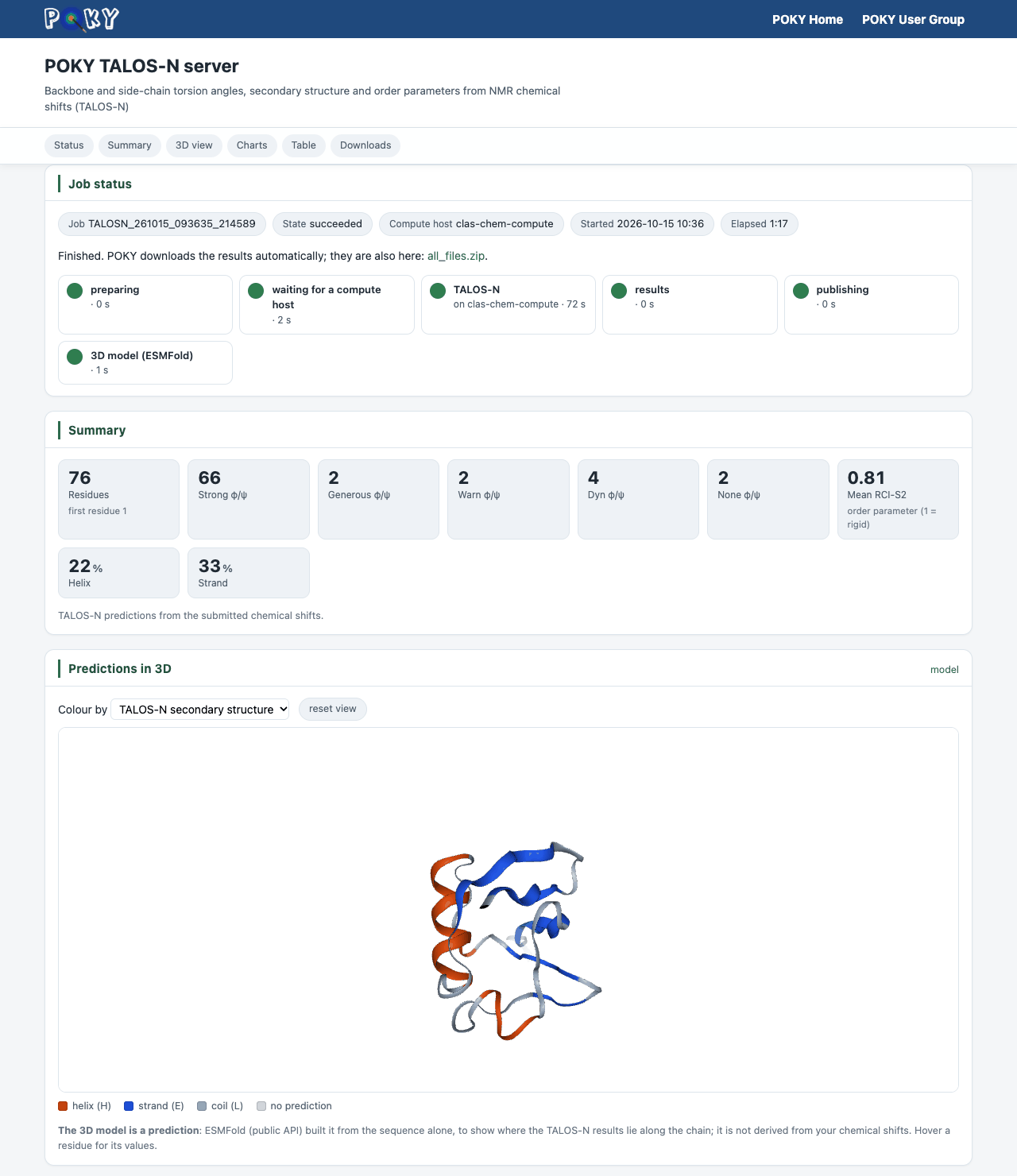
| TALOS-N | Backbone φ/ψ and side-chain χ1 angles, secondary structure and RCI-S2 order parameters from chemical shifts | tl, then choose POKY (TALOS-N) | POKY downloads the results by itself; the link is in a REMARK line of every
pred*.tab file |
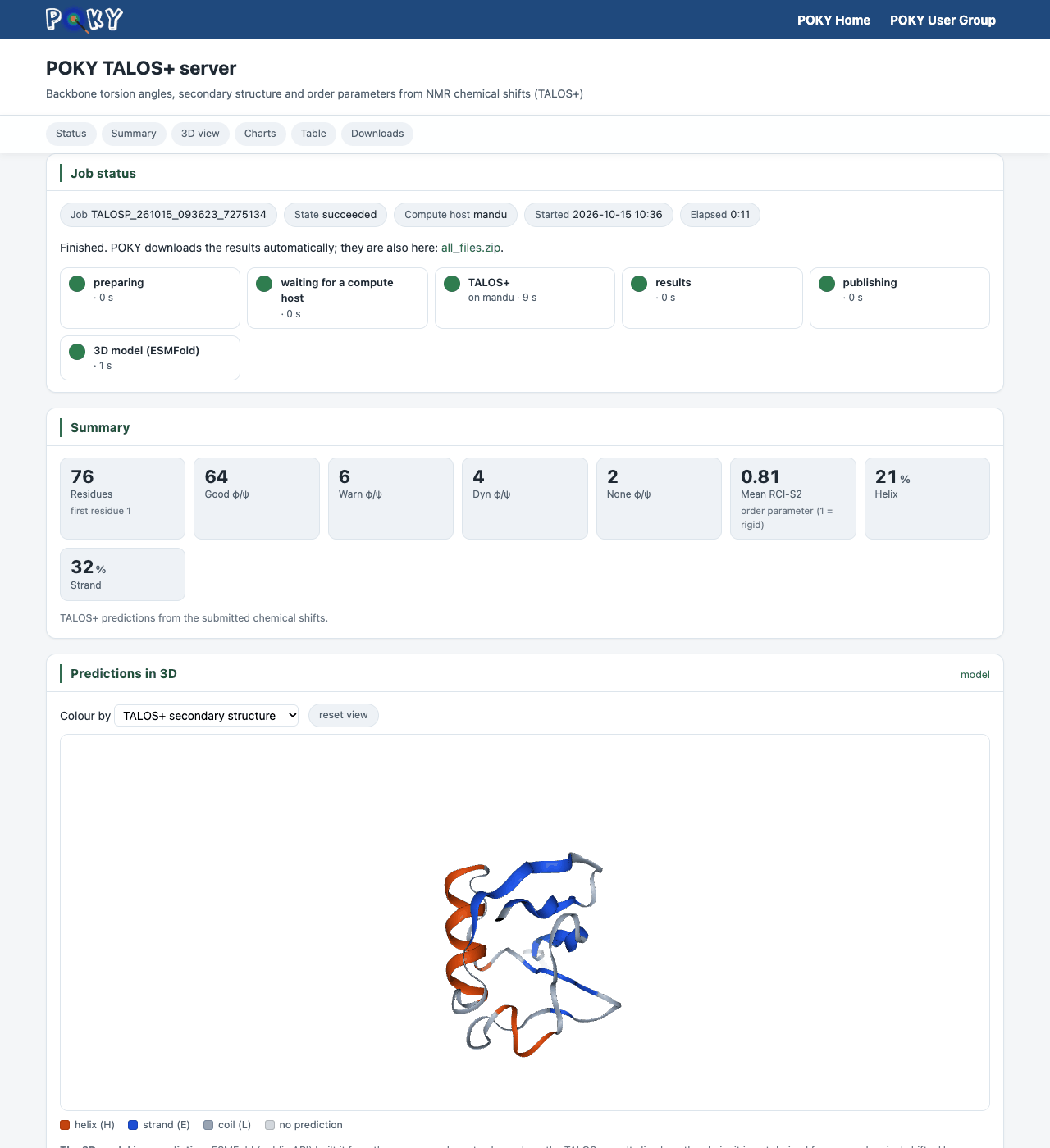
| TALOS+ | Backbone φ/ψ, secondary structure and RCI-S2 from chemical shifts | tl, then choose POKY (TALOS+) | Same as TALOS-N |
| TAPAS | Backbone and side-chain torsions (φ, ψ, ω, χ1, χ2), 3-state secondary structure, RCI-S2 and SASA from chemical shifts, with a calibrated per-residue reliability | Ts; also started automatically with every TALOS-N/TALOS+ job | The Dashboard button of the TAPAS dialog; for TALOS jobs, a REMARK line in
every pred*.tab file |
| I-PINE | Probabilistic backbone and side-chain assignment of proteins (solution NMR) | ep | Link in the e-mail sent when the job finishes, or the Web... button next to the Key field of the dialog |
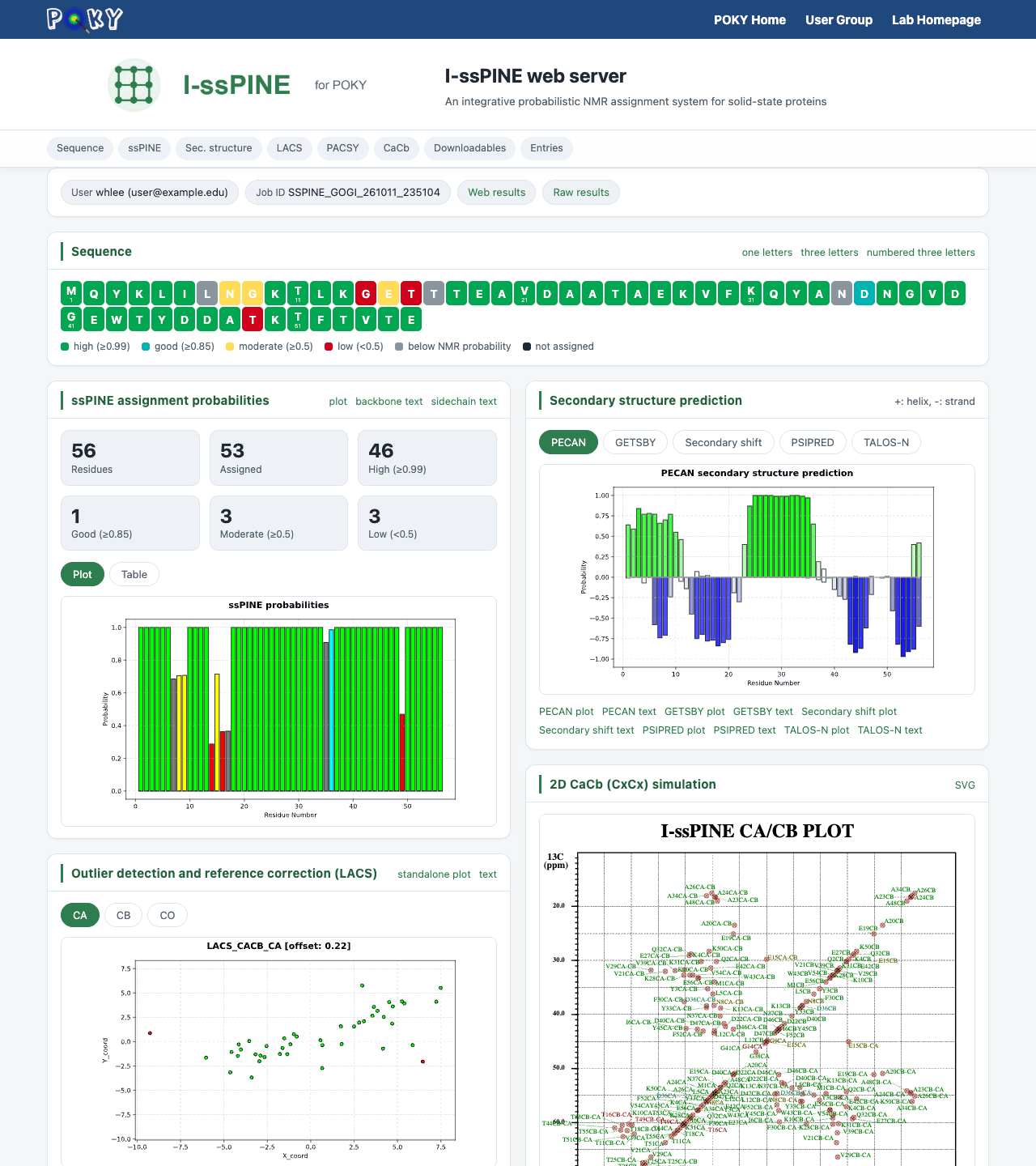
| I-ssPINE (ssPINE-POKY) | Probabilistic assignment of solid-state NMR spectra of proteins | EP | Link in the e-mail sent when the job finishes, or the Web... button next to the Key field of the dialog |
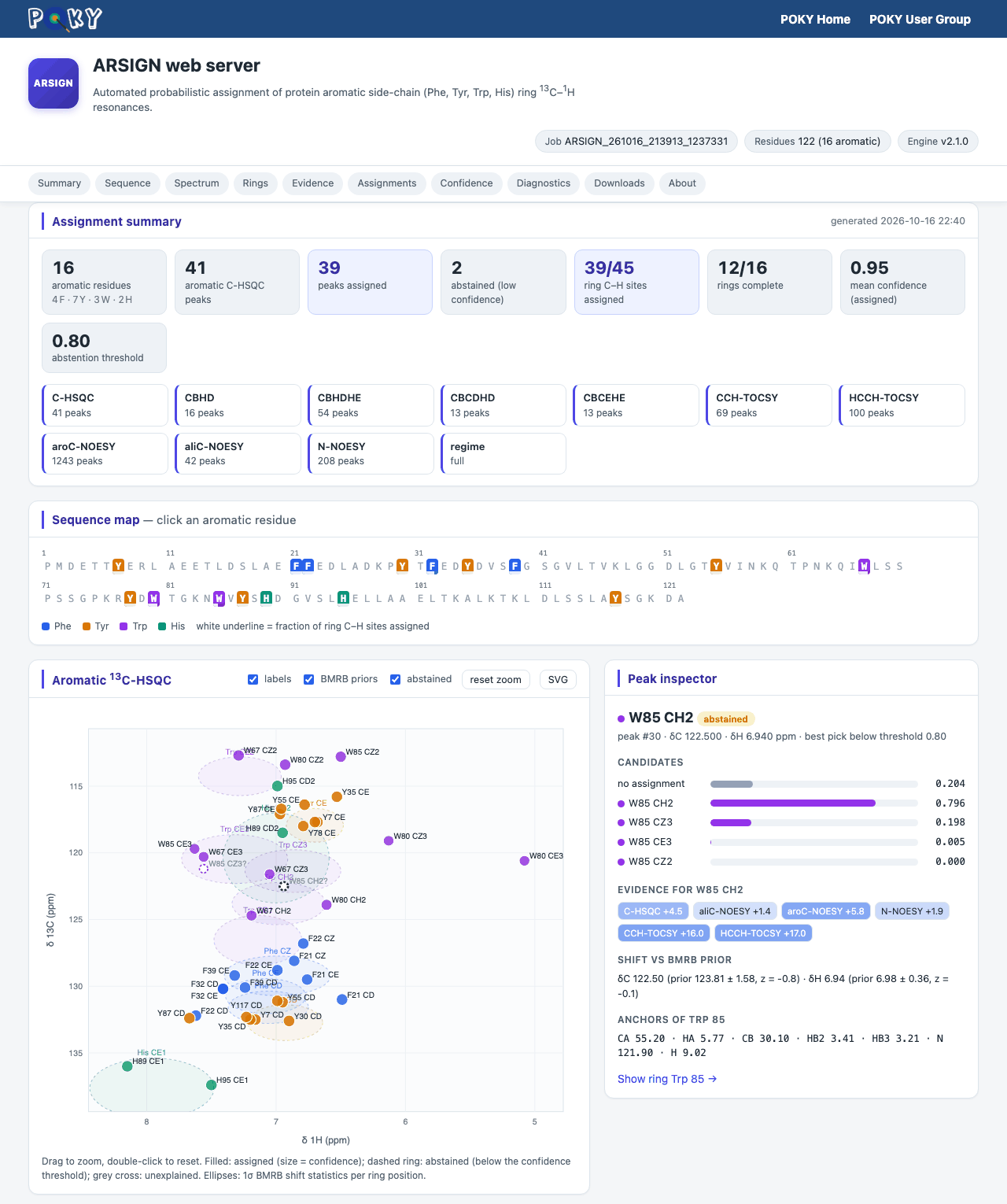
| ARSIGN (ARSIGN-POKY) | Probabilistic assignment of aromatic side-chain ring 13C–1H resonances (Phe, Tyr, Trp, His) | ar | Link in the e-mail you receive when the job starts and when it finishes |
| IMINA (RNA-PAIRS) | Probabilistic assignment of RNA imino signals and base pairs from HSQC and NOESY | ER (RNA-PAIRS dialog) | Link in the e-mail sent when the job finishes |
Jobs submitted to the POKY RNA-PAIRS interface are served by the IMINA engine and return the IMINA dashboard.
Opening a dashboard
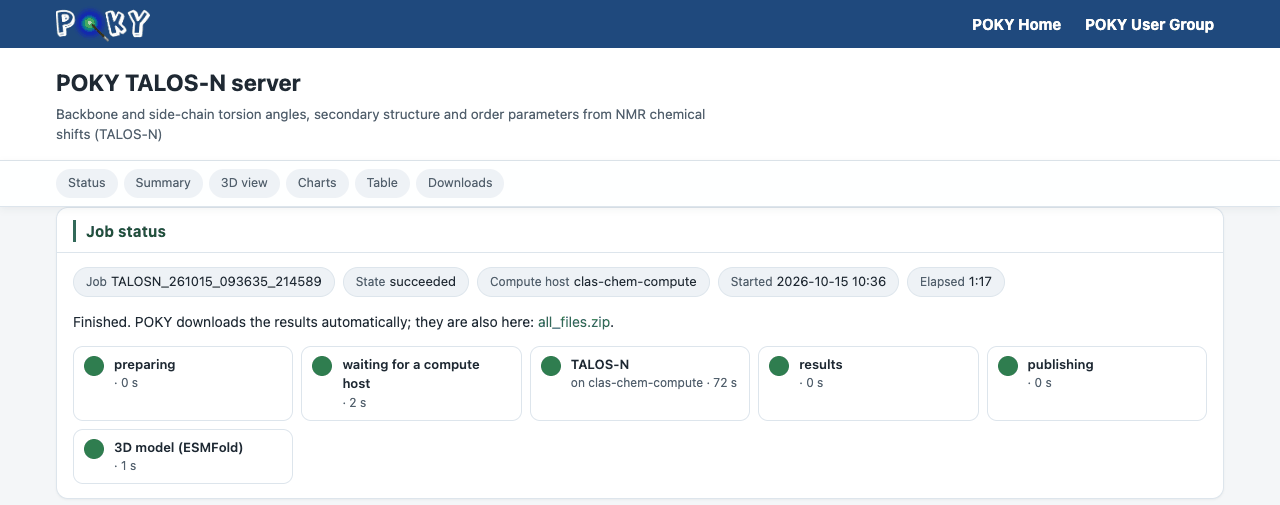
Dashboard addresses look like one of these, where <JOB> is the job ID POKY shows you
(for example TALOSN_261015_093635_214589):
- PONDEROSA-C/S, MolProbity, TALOS-N, TALOS+:
https://poky.clas.ucdenver.edu/serverside/queue/<JOB>/web_results/index.html - I-PINE, I-ssPINE:
https://poky.clas.ucdenver.edu/serverside/results/<JOB>/web_results/ - ARSIGN, IMINA:
https://poky.clas.ucdenver.edu/serverside/results/<JOB>/web_results/index.html
REMARK line at the top. For I-PINE
and I-ssPINE, put the job ID in the Key field of the dialog and click Web....
For ARSIGN, put the job ID (shown in the Key field of the ARSIGN-POKY dialog) into the
ARSIGN address above.
Common layout
- POKY header — the dark-blue bar at the top, with links to the POKY home page and the user group.
- Title — which server made the page, with a one-line description.
- Section chips — the row of rounded buttons under the title. Click one to jump to that section; on most dashboards the row stays at the top of the window while you scroll.
- Cards — each section is a white card with a title. Links at the right end of a card title open the plot or data file behind it.
- Footer — contact links; on the MolProbity and TALOS pages also the job ID, when the page was generated and how long the results are kept.
Job status and the stage timeline
The MolProbity and TALOS dashboards start with a status card: the job ID, its state, the compute host it ran on, the start time and the elapsed time, followed by a timeline of the stages (preparing → waiting for a compute host → the calculation → results → publishing). A green dot marks a finished stage, with its duration. The PONDEROSA-C/S page shows the same information in its Your job card and a Progress section.
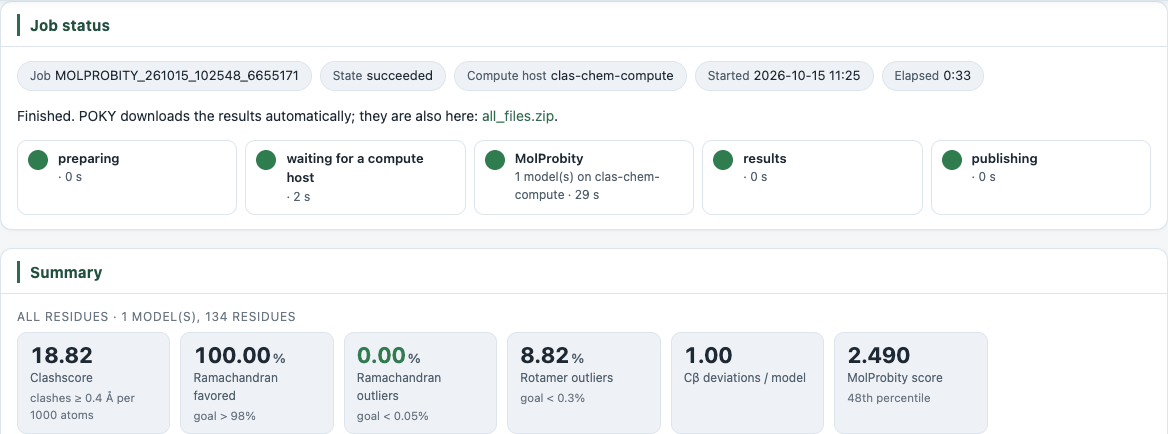
While a PONDEROSA-C/S, MolProbity, TALOS or I-PINE job is running, its page reloads itself every 30 seconds, so you can leave it open and watch the job progress. When the job is finished the reloading stops. The ARSIGN page shows a short Your ARSIGN job is running notice and reloads every minute until the results replace it.
Using a dashboard
- Summary tiles — the boxed numbers at the top. On the PONDEROSA-C/S page, hover a tile for a short explanation of the value.
- 3D viewer — drag to rotate, scroll to zoom, and use reset view to go back to the start. Menus and check boxes above the viewer choose the model and what is drawn or how it is coloured. Clicking a residue in a list next to the viewer zooms to it.
- Plots — on interactive plots, hover a point or bar to see its residue and value. Buttons above a plot switch between related plots (for example CA/CB, or Plot/Table).
- Residue maps — the coloured one-letter strips. Hover or click a residue for its details; the legend under the strip explains the colours.
- Downloads — every output file, and a zip archive of all of them.
PONDEROSA-C/S
The PONDEROSA-C/S page is described in detail on the PONDEROSA-C/S page. Its sections are: Your job (job ID, mode, run time, compute host and the date the results will be removed), Summary, Structure (3D viewer of the ensemble, with consistent violations you can draw in every model), Sequence, Ordered region, Structure calculation, Restraints, Ramachandran plot, Downloads and How to cite. While the job runs, the page shows its progress and the calculation so far instead.
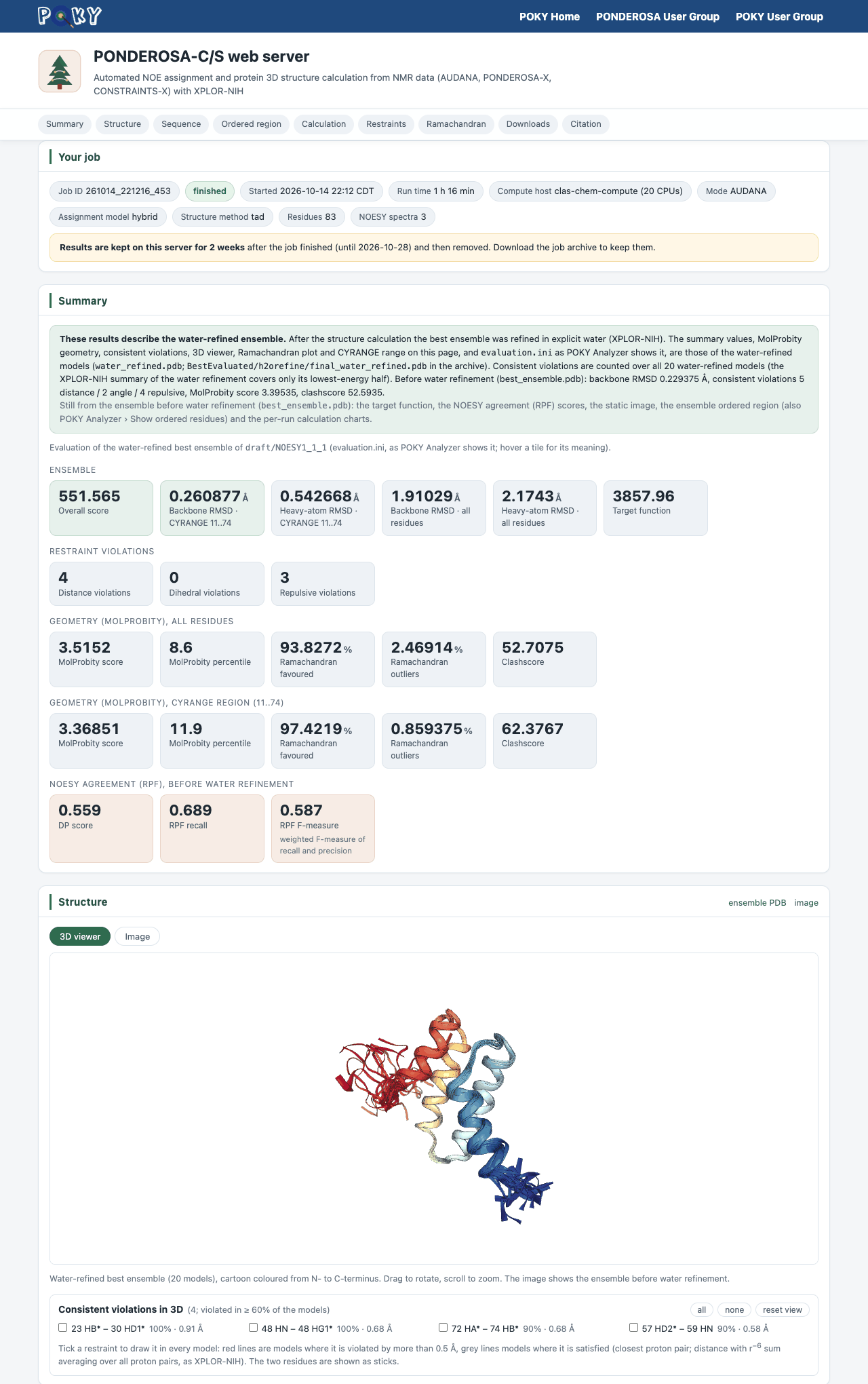
To continue in POKY, download the job archive from Downloads and open it with the POKY Structure Analyzer Pa.
MolProbity
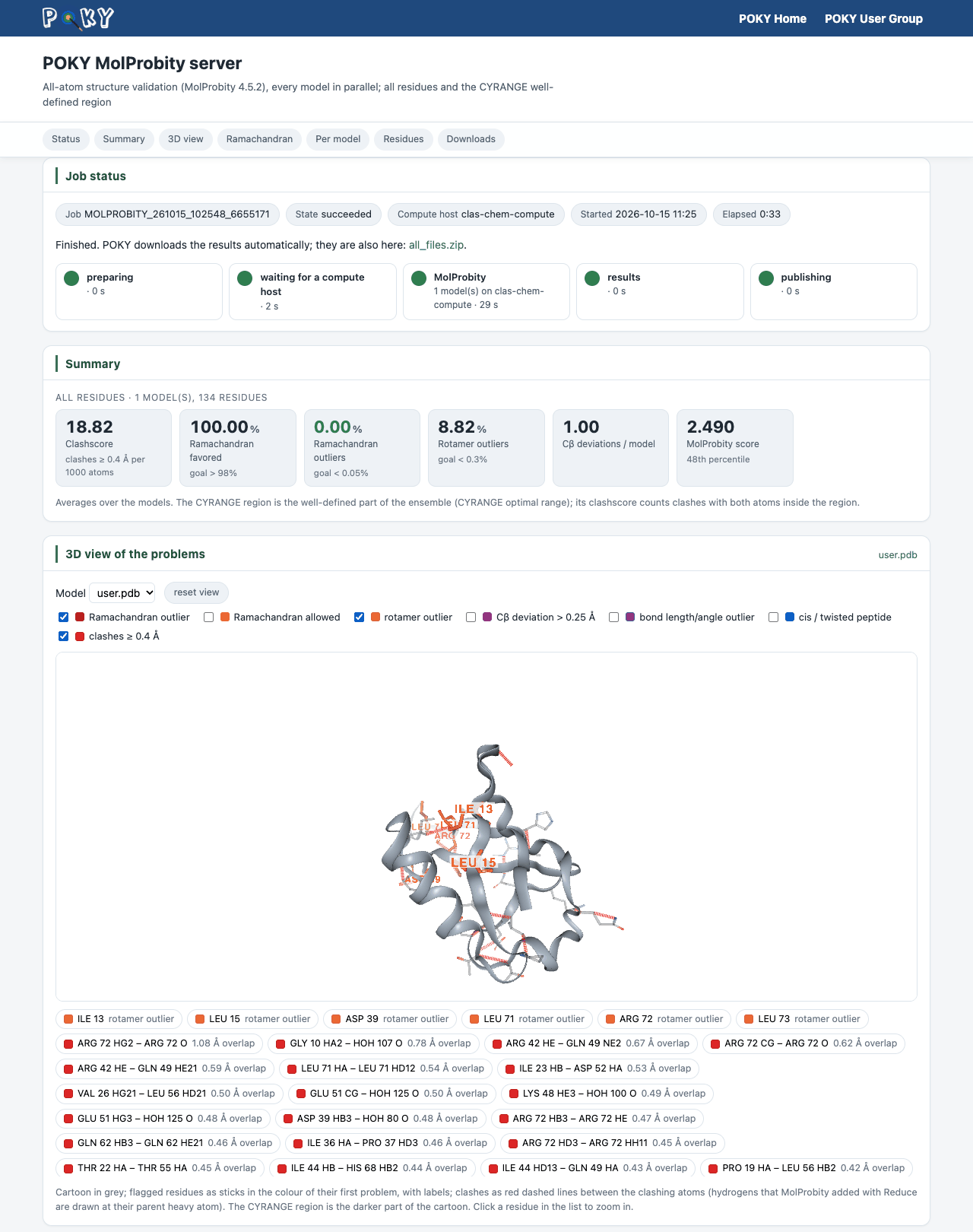
Type MP and choose a PDB or mmCIF file (an mmCIF file is converted to PDB first). Every model of an ensemble is evaluated in parallel. POKY waits for the job, downloads the results into the folder of your PDB file and shows a summary. The dashboard has these sections:
| Section | What it shows |
|---|---|
| Job status | The status card and stage timeline. |
| Summary | Clashscore, Ramachandran favoured and outliers, rotamer outliers, Cβ deviations and the MolProbity score with its percentile, averaged over the models — for all residues and for the CYRANGE well-defined region. Each tile shows the goal value. |
| 3D view of the problems | The structure as a grey cartoon with every flagged residue as sticks in the colour of its problem, and clashes as red dashed lines. Check boxes turn each kind of problem on or off (Ramachandran outlier/allowed, rotamer outlier, Cβ deviation, bond length/angle outlier, cis/twisted peptide, clashes); the list under the viewer zooms to a residue or clash. |
| Ramachandran plot | φ/ψ of every residue of every model: grey favoured, amber allowed, red outlier. |
| Per model | The scores of each model, for all residues and the CYRANGE region. |
| Flagged residues | For each residue, the number of models in which MolProbity flags it, by problem type. |
| Downloads | All MolProbity output files and the zip archive. |
TALOS-N and TALOS+
Type tl. POKY writes your chemical shifts as a TALOS .tab file and
asks which server to use: NIH, POKY (TALOS-N) or POKY (TALOS+). With the two
POKY choices, POKY waits for the job, downloads pred.tab, predS2.tab,
predSS.tab, talos.aco and talos.tbl, and plots them. The
TALOS-N and TALOS+ dashboards have the same layout:
| Section | What it shows |
|---|---|
| Job status | The status card and stage timeline. |
| Summary | Number of residues, the counts of each φ/ψ prediction class (Strong, Generous, Warn, Dyn, None for TALOS-N; Good, Warn, Dyn, None for TALOS+), the mean RCI-S2 order parameter, and the helix and strand fractions. |
| Predictions in 3D | A 3D model of your sequence coloured by the predictions. Use Colour by to switch between secondary structure, RCI-S2, prediction class, angle uncertainty, χ1 (TALOS-N only) and the model's own confidence (pLDDT). Hover a residue for its values. |
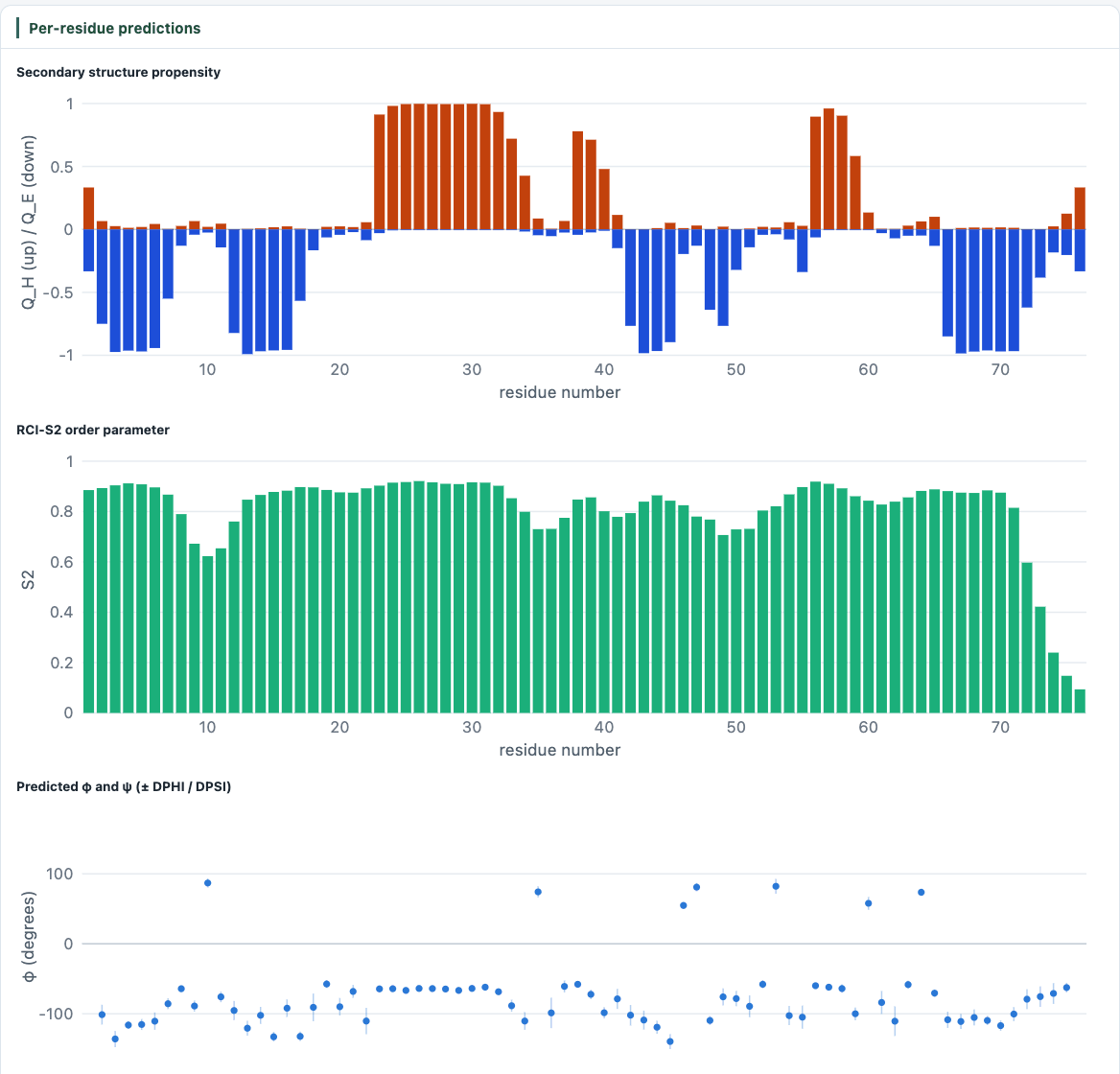
| Per-residue predictions | Charts of the secondary-structure propensity, RCI-S2, and the predicted φ and ψ with their error bars. |
| Table | All predicted values, residue by residue. |
| Downloads | All TALOS output files and the zip archive. |
I-PINE
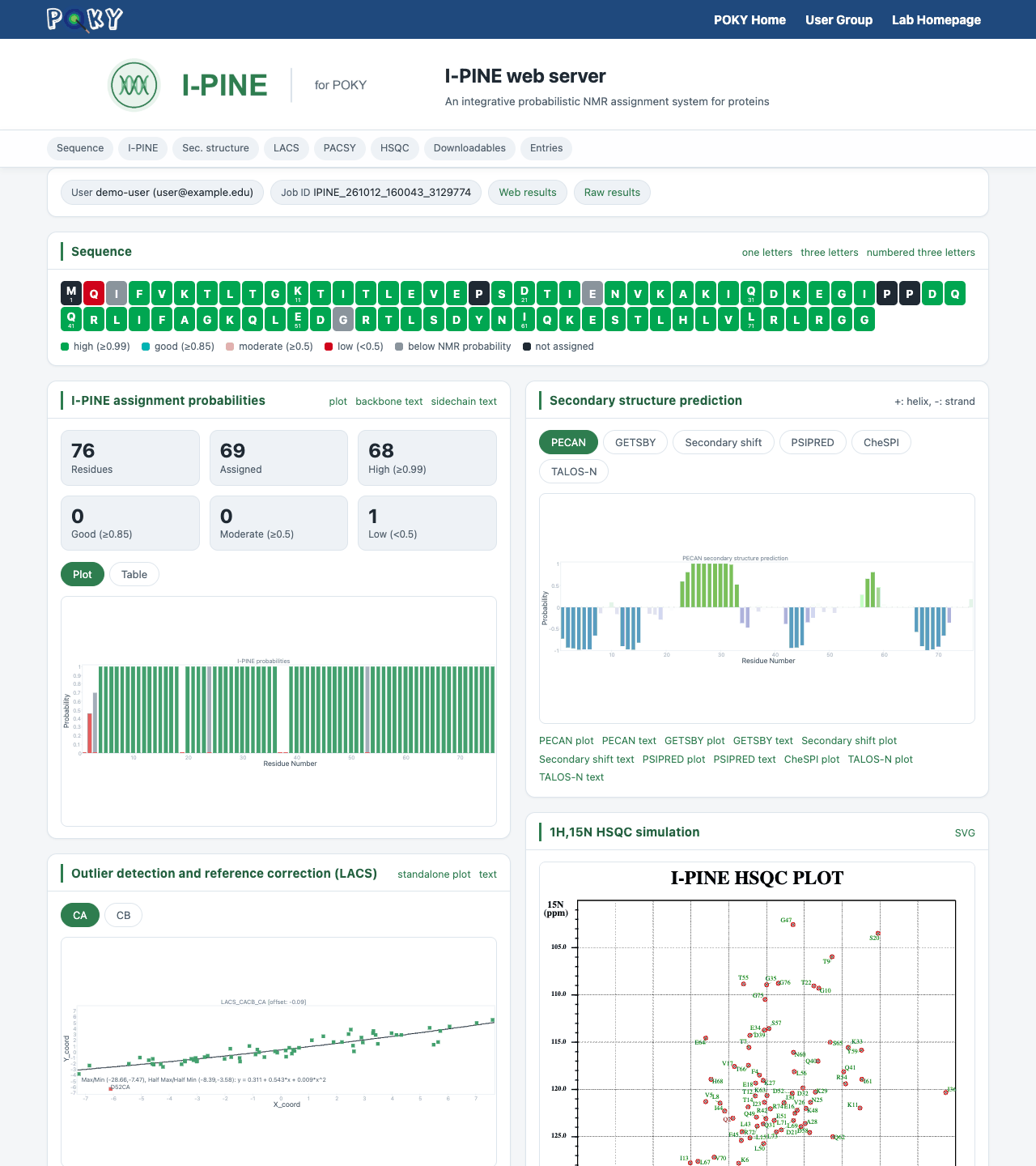
Type ep to open the PINE-SPARKY.2 dialog and submit your peak lists (see Automatic Assignment). When the job finishes you receive an e-mail with the dashboard link. The Check button of the dialog downloads the results into your project, and the Web... button next to the Key field (the job ID) opens the dashboard.
| Section | What it shows |
|---|---|
| Sequence | The sequence coloured by assignment probability (high, good, moderate, low, below NMR probability, not assigned). |
| I-PINE assignment probabilities | Counts per probability class, and a plot or table of the probability of every residue. |
| Secondary structure prediction | PECAN, GETSBY, secondary shift, PSIPRED, CheSPI, TALOS-N and TAPAS predictions, one tab each. |
| TAPAS | The TAPAS results page for the assigned shifts (torsion angles, secondary structure, RCI-S2 and solvent accessibility with per-residue reliability), embedded, with links to its tables and restraints. It appears a few minutes after the I-PINE e-mail. |
| LACS | Outlier detection and chemical-shift reference correction (CA and CB). |
| 1H,15N HSQC simulation | The HSQC simulated from the assigned shifts, with the residues missing from it listed below. |
| Solvent exposure (PACSY) | Buried, medium and exposed residues predicted from the PACSY database. |
| Downloadable I-PINE outputs | Sequence files, plots and every result file, and the zip archive. |
| Other sections | Cysteine oxidation state, proline isomerization state, RCI-S2, TALOS-N on the PACSY Ramachandran map, a computed 3D structure and related PACSY entries. |
I-ssPINE (ssPINE-POKY)
Type EP to open the ssPINE-POKY dialog. The Check and Web... buttons work as in I-PINE. The I-ssPINE dashboard has the same layout as the I-PINE one, with a 2D CaCb (CxCx) simulation in place of the HSQC simulation, LACS for CA, CB and CO, and a section for probabilistic side-chain assignments.
ARSIGN (ARSIGN-POKY)
Type ar to open the ARSIGN-POKY dialog, add the aromatic spectra with Add and
click Submit (see Automatic Assignment). You receive an
e-mail with the dashboard link when the job starts and again when it finishes. The
Check button of the dialog downloads the results (all_files.zip) into your
project as before. The page is a single file that works offline once loaded, so you can also save it
from the browser.
| Section | What it shows |
|---|---|
| Assignment summary | Number of Phe/Tyr/Trp/His residues, aromatic C-HSQC peaks, peaks assigned and abstained, ring C–H sites assigned, complete rings, mean confidence and the abstention threshold; one tile per experiment with the number of peaks read. |
| Sequence map | The sequence with the aromatic residues coloured by type; the white underline shows the fraction of each ring that is assigned. Click a residue to jump to its ring. |
| Aromatic 13C-HSQC | Every input peak, coloured by residue type: filled = assigned (size = confidence), dashed ring = abstained, grey cross = unexplained. Faint ellipses show the BMRB shift statistics of each ring position. Drag to zoom, double-click to reset, and click a peak to inspect it. SVG saves the plot. |
| Peak inspector | For the selected peak: all candidate assignments with their probabilities, the evidence each experiment contributes (log likelihood ratio; blue supports, red contradicts), the shift compared with the BMRB statistics, and the residue's backbone/Cβ anchors. |
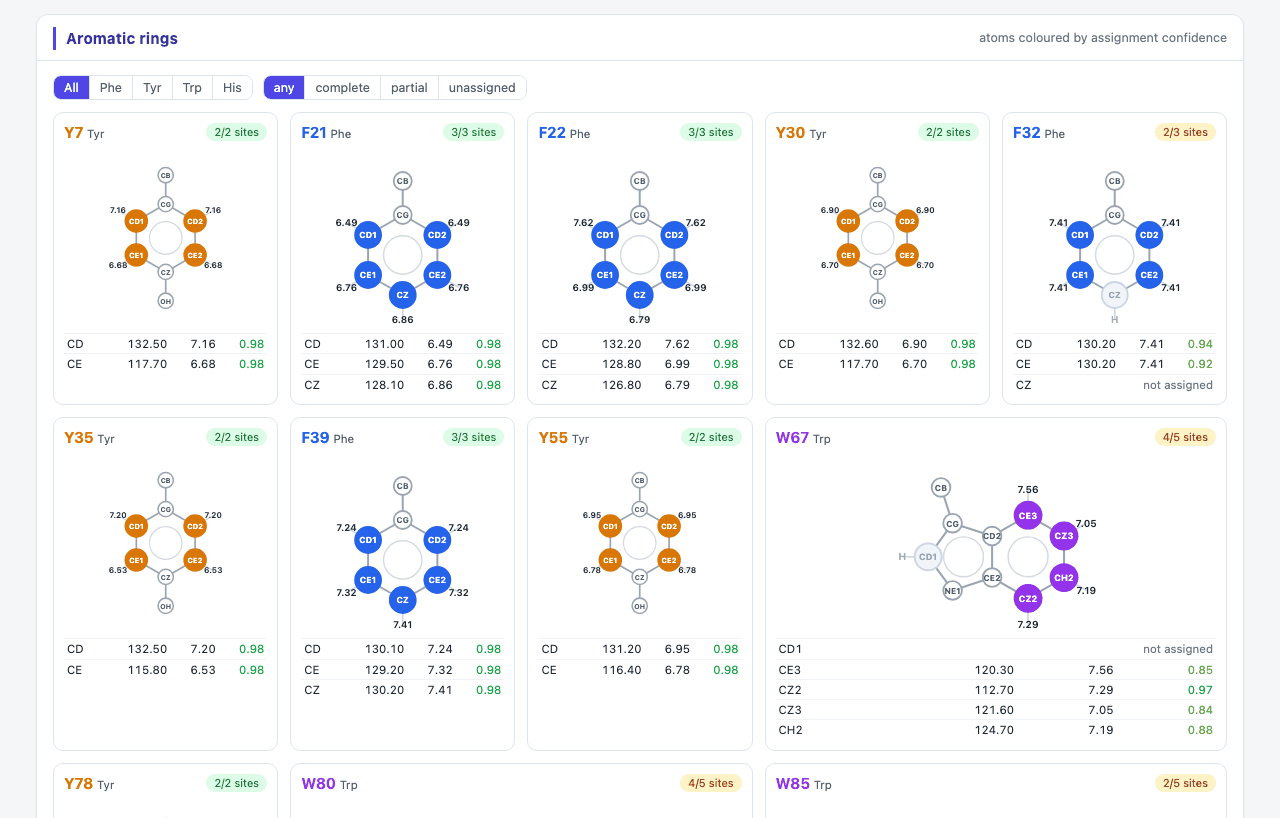
| Aromatic rings | A ring diagram for every Phe, Tyr, Trp and His with the assigned 1H shifts and atoms coloured by confidence (dashed = abstained, grey = not assigned), and a table of the 13C/1H shifts. Filter by residue type or by complete/partial/unassigned rings; click an atom to inspect its peak. |
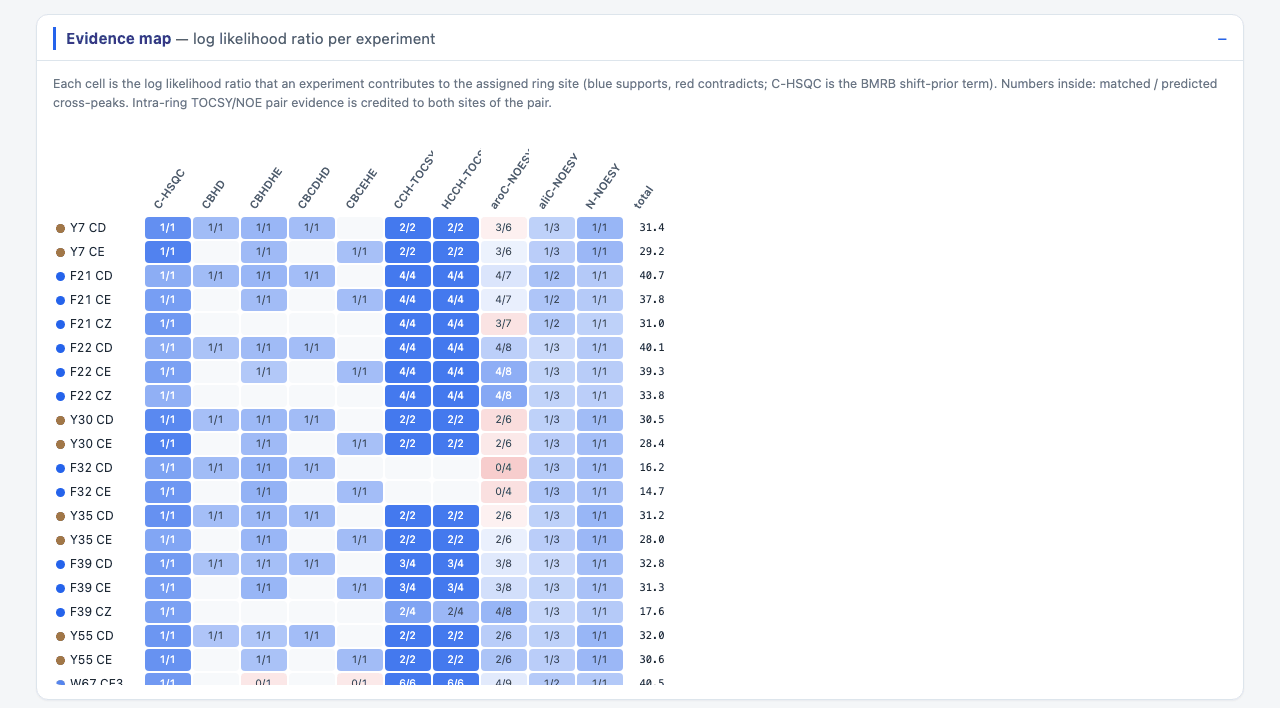
| Evidence map | One row per assigned ring site and one column per experiment: the colour is the evidence the experiment adds, the number is matched/predicted cross-peaks. |
| Peak assignments | Sortable, searchable table of all peaks with confidence bars, status and alternatives; CSV exports it. |
| Confidence distribution / Needs review | Histogram of the calibrated confidences with the threshold, and a list of what to check by hand: abstained peaks, unexplained peaks and incomplete rings. |
| Engine diagnostics | Run settings, the detection probabilities fitted to your protein and the input files. |
| Downloads | all_files.zip, the engine JSON, the CSV, the spectrum SVG and the
resonance list with the assigned ring shifts. |
?) instead of committing a possibly wrong assignment. These peaks are listed under
Needs review.
IMINA (RNA-PAIRS)
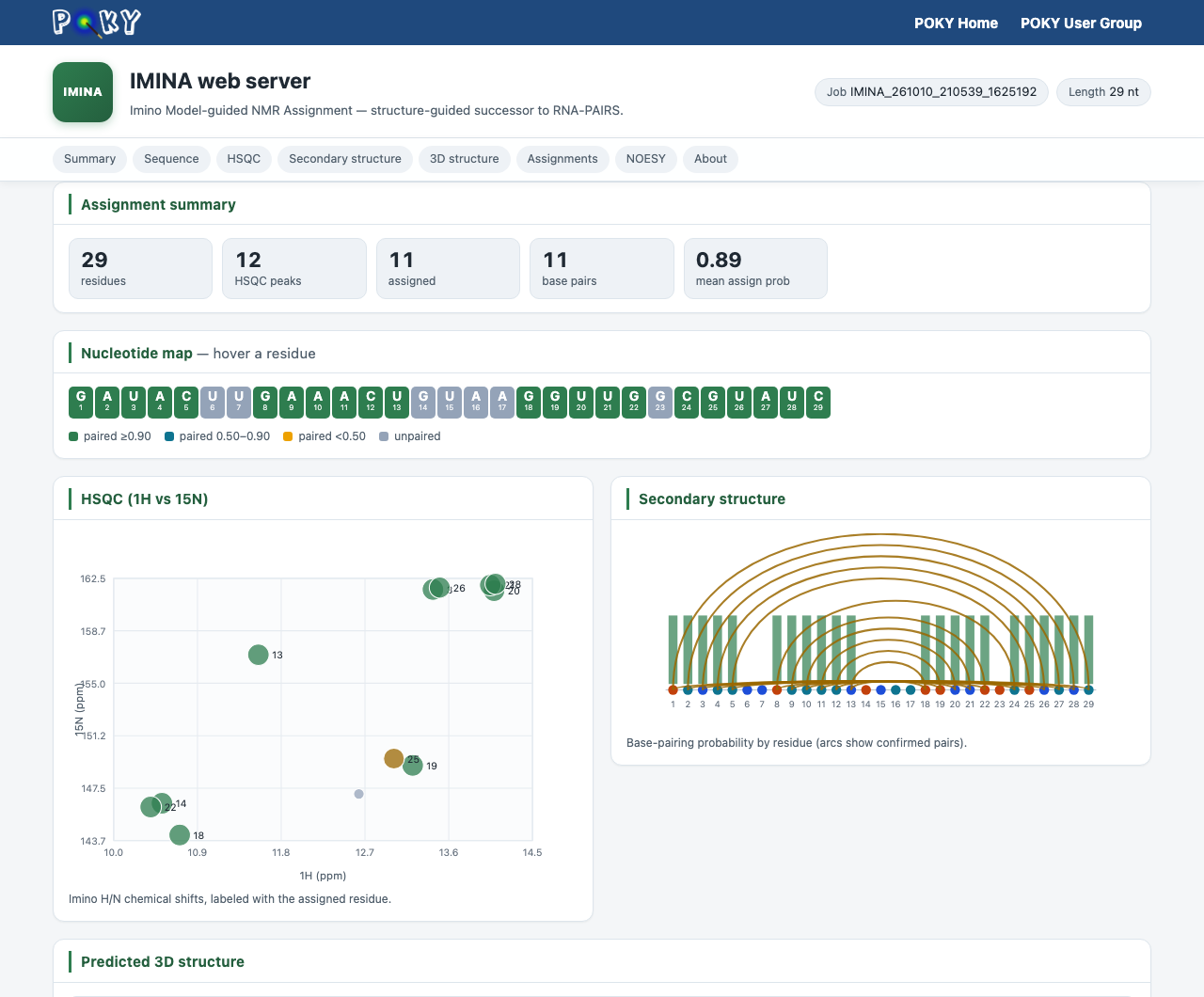
Type ER to open the RNA-PAIRS dialog and submit the imino HSQC and NOESY peak lists (see Automatic Assignment). IMINA (Imino Model-guided NMR Assignment) assigns the imino signals of RNA. Its dashboard shows an assignment summary, a nucleotide map coloured by base-pairing probability, the imino HSQC with the assigned residues, the secondary structure as an arc plot, a predicted 3D structure, and tables of the HSQC assignments, the secondary structure and the NOESY interactions.
TAPAS
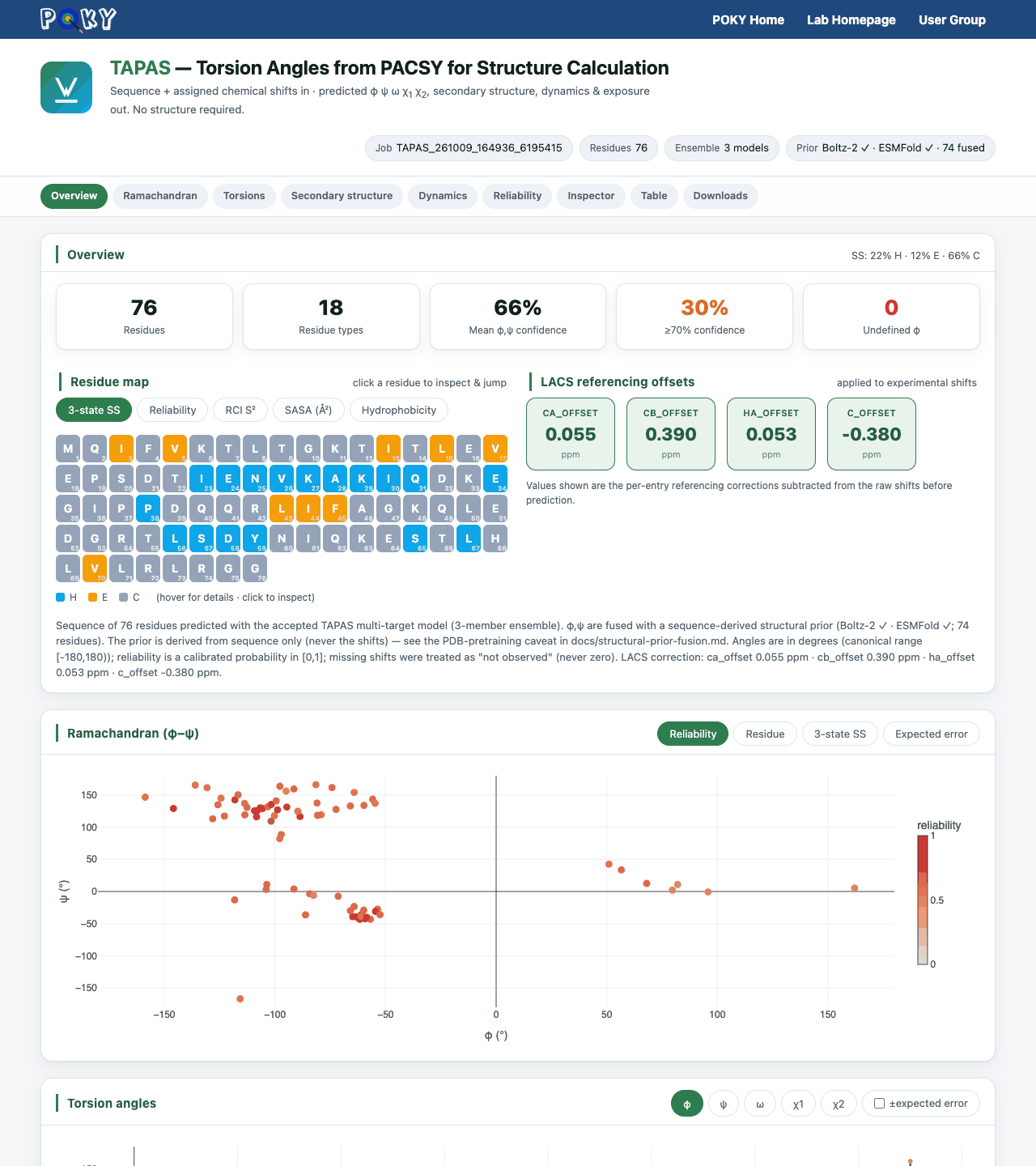
TAPAS (Torsion Angles from PACSY for Structure calculation) predicts φ, ψ, ω, χ1 and
χ2, 3-state secondary structure, RCI-S2 dynamics and solvent exposure (SASA) from the sequence and
assigned chemical shifts, without needing a structure, and gives every prediction a calibrated
reliability. Start it with Ts (see the TAPAS
page); every TALOS-N and TALOS+ job also starts a TAPAS job on the same shifts, and the TAPAS
dashboard link is written in a REMARK line of the TALOS pred*.tab files.
The dashboard has an Overview (residue map, LACS referencing offsets), a Ramachandran plot,
torsion-angle plots, secondary structure, dynamics and exposure, reliability, a residue inspector, a
table and downloads. Its address is
https://poky.clas.ucdenver.edu/serverside/results/<job ID>/web_results/.
Privacy and how long pages are kept
- Dashboards are not listed anywhere (the PONDEROSA-C/S, MolProbity and TALOS pages also ask search engines not to index them), but anyone who has the link can open the page. Share it only with people who may see your data.
- PONDEROSA-C/S, MolProbity and TALOS results are kept on the server for 2 weeks and then removed. The PONDEROSA-C/S page shows the exact date. Download the zip archive to keep your results.
- For the TALOS 3D view, your protein sequence (not your chemical shifts) is sent to the public ESMFold service.
Troubleshooting
| Problem | What to do |
|---|---|
| The 3D viewer stays empty or shows an error | The viewer needs WebGL. Turn on hardware acceleration in your browser settings, update the browser, or try another browser. The rest of the page works without it. |
| The page still says the job is running | It reloads by itself every 30 seconds. Busy servers can take a while to give your job a compute host; the timeline shows which stage it is in. |
| The link no longer works | The results have probably been removed after the retention period. Submit the job again. |
| A job failed | The status card shows the error. Ask in the POKY user group (or the PONDEROSA user group) and include the job ID. |